The World Clock5.1.2
Publisher Description
> Best World Clock app - Featured By Apple in staff favorites in US and 92 countries > Optimized for iPad Retina Display! iPhone 5 support coming soon! >
Why we are better than the others? Read below!
> The World Clock provides the best and most accurate time conversion options
There are two (iPhone) or three (iPad) ways to convert and compare times:
scroll the map to convert the time within past or future 24 hours
tap the date button in the toolbar to select specific date, time or timezone (iPad only)
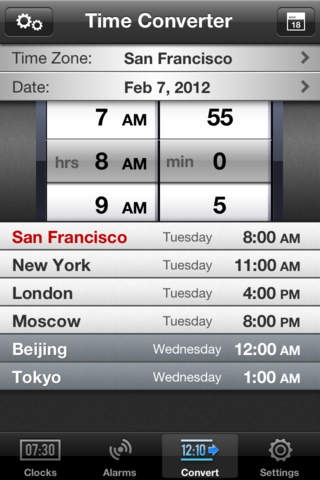
open the time Converter/Meeting Planner window by selecting the Convert tab (iPhone) or Convert button in the toolbar (iPad). This option allows to select date, time, timezone, working hours, tome zone sorting and more.
Unlike other apps on the app store, some pretending to be "Pro" World Clocks, the conversion takes into account daylight savings time changes.
> The World Clock is accurate
The app uses special internet time protocol to connect to atomic time server. For security reasons Apple does not allow third party apps to change the time on the device, but The World Clock shows the time with sub-second accuracy and displays the difference between the atomic clock and the time on the device and may display a warning when the time on the device is off.
Most world clock apps rely on the time zone database provided by iOS. This database is updated by Apple infrequently and does not contain recent changes for many countries. Almost all competitive apps were showing or still show wrong time for half a dozen countries - Russia, Chile, Morocco, Belarus, Fiji, Armenia, Samoa and more.
If needed, The World Clock updates the timezone database on launch. If you encounter wrong time for a location, send us a mail using "Send Feedback" option and we will correct the problem within 24 hours. The size of the update is very small, about 4 kilobytes.
> The World Clock shows the most accurate and attractive day/night map
Our day/night map is calculated using very precise and efficient algorithm. You can even scroll the "darkness" with unmatched precision and performance. Enjoy the equinox twice a year! Some of the apps on the app store, e.g. World Clock Pro, show highly inaccurate day/night map, which sometimes is off by more than 2 hours for certain locations!
> See the time at a glance
The World Clock implements has customizable clock face color change rules (main screen and time converter on the iPad, Converter tab on the iPhone). Selecting proper rule, e.g. from 9 AM till 9PM, allows to see whether it is OK to make a call at a single glance!
> Send email invitations or add an event to the Calendar
Tap the calendar icon in the Converter/Meeting Planner window or after scrolling the map on the main screen (iPad only) and compose a mail with a neat time table for a meeting.
> The largest database of populated places - more than 230 countries, almost 200000 populated places, plus UTC/GMT with offsets.
Note that when adding a clock, you need to select the country first, then the city.
> The World Clock provides Alarm with time zone support
Please make sure the notifications are turned on in the Settings app (Settings -> Notifications)
> Comprehensive information about the selected cities
This includes GMT offset, difference with your local time, dates for daylight savings time changes, coordinates, sunrise, sunset and more! You can select to display some of this information along the time on the main screen/ Clocks tab.
> on iPad - 9 clock designs (5 analog and 4 digital), full screen mode for larger clocks: swipe the map handle up, swipe down to bring the map back!
Credits:
The Day and Night Map is generated based on images from the NASA Visible Earth Project.
Design improvements by Marcello Luppi, Wrinkly Pea Design
Requires iOS 4.0 or later. Compatible with iPhone, iPad, and iPod touch.
About The World Clock
The company that develops The World Clock is Orlin Kolev. The latest version released by its developer is 5.1.2.
To install The World Clock on your iOS device, just click the green Continue To App button above to start the installation process. The app is listed on our website since 2010-04-30 and was downloaded 7 times. We have already checked if the download link is safe, however for your own protection we recommend that you scan the downloaded app with your antivirus. Your antivirus may detect the The World Clock as malware if the download link is broken.
How to install The World Clock on your iOS device:
- Click on the Continue To App button on our website. This will redirect you to the App Store.
- Once the The World Clock is shown in the iTunes listing of your iOS device, you can start its download and installation. Tap on the GET button to the right of the app to start downloading it.
- If you are not logged-in the iOS appstore app, you'll be prompted for your your Apple ID and/or password.
- After The World Clock is downloaded, you'll see an INSTALL button to the right. Tap on it to start the actual installation of the iOS app.
- Once installation is finished you can tap on the OPEN button to start it. Its icon will also be added to your device home screen.
